
Filter Objects
Use JOSM’s native Filter panel to temporarily hide, show, or isolate objects by tag.
Open the Filter Panel
- Open Windows > Filter.
- The Filter panel appears in the side bar.
- Click Add to create a new filter.
Filter by Corridor Class
Use the canonical structural class when you want a clear network review. To isolate ordinary en-route corridors, add:
way_type=corridor
Enable the filter and choose whether matching objects are hidden or disabled. Invert the filter when you want the matching corridor class to remain visible.
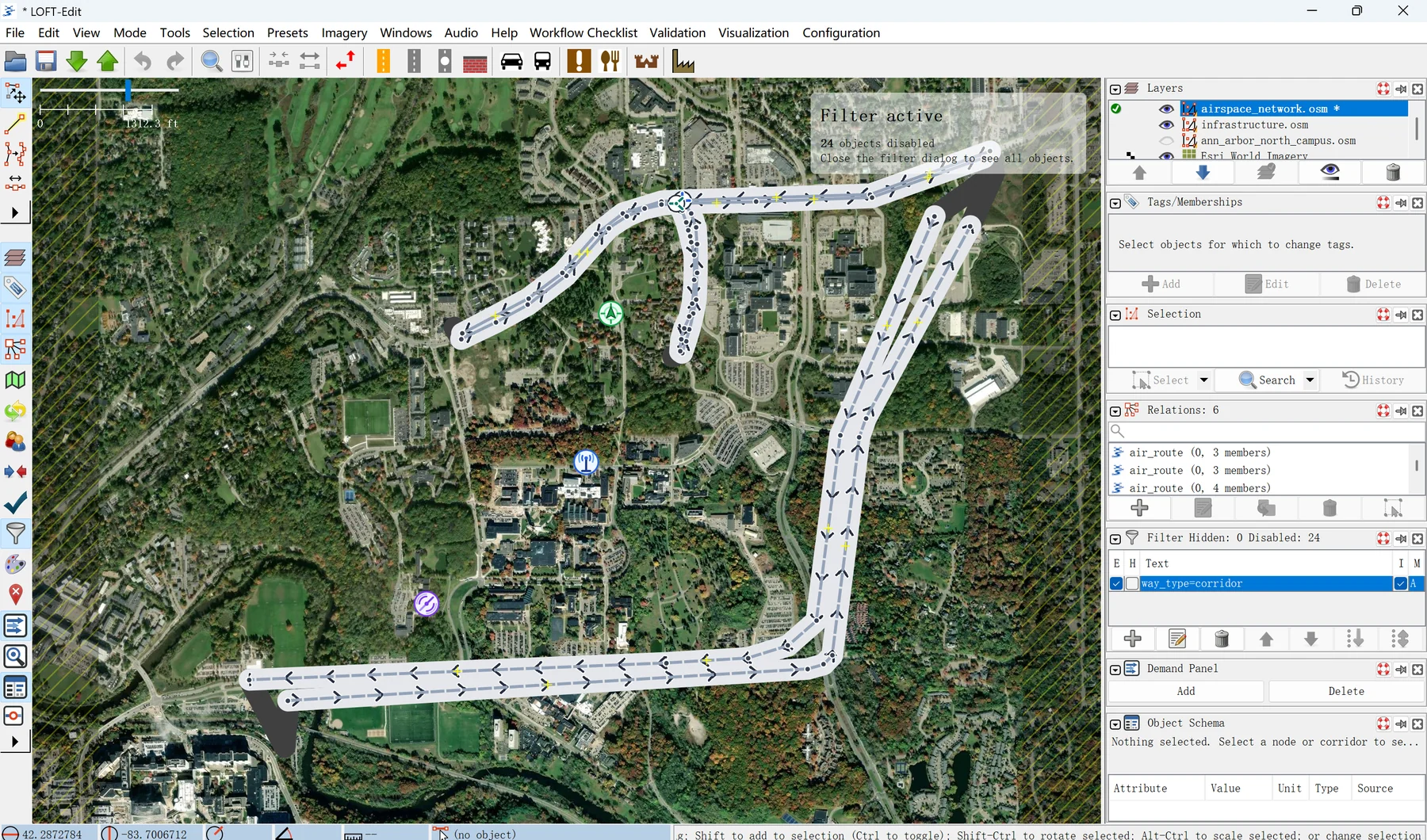
In the figure below the filter is enabled (E) and inverted (I) with H
(hide) left unchecked, so the corridors stay editable and the other objects on
the active airspace_network.osm layer are disabled rather than hidden: they
are greyed out and cannot be selected. The panel title and the Filter active
notice on the map report how many objects are disabled.
Common Queries
| Purpose | Query |
|---|---|
Show every corridor way that carries a way_type tag |
way_type=* |
| Show regular corridor ways | way_type=corridor |
| Show vertiport terminal links | way_type=vertiport_terminal |
| Show all airspace nodes | node_type=* |
| Show vertiports | node_type=vertiport |
| Show contingency landing sites | node_type=cont_site |
| Show intersections | node_type=intersection |
| Show diverging points | node_type=diverging_point |
| Show communication sites | node_type=comm_site |
| Show navigation sites | node_type=nav_site |
| Show surveillance sites | node_type=surv_site |
| Find airspace nodes missing altitude | -altitude (node_type=waypoint OR node_type=vertiport OR node_type=cont_site OR node_type=intersection OR node_type=diverging_point) |
| Find nodes missing Node ID | node_type=* -node_id |
| Find corridors missing Corridor ID | way_type=* -corridor_id |
| Find routes missing Route ID | type=air_route -route_id |
| Find fast corridors | nominal_speed>20 |
| Find large geofencing buffers | geofencing_buffer>80 |
Practical Notes
- Use
way_typefor structural class, such as regular corridors versus vertiport terminal links. corridor_type,priority_level,priority_corridor, anddirectionare retired network tags and should not be added for filtering.- Filters only change what is visible in JOSM. They do not modify the OSM file.