
Example Projects
The example projects show how LOFT-Edit can turn a geographically anchored UAM concept into a simulator-ready scenario. Instead of presenting an abstract network, these examples place vertiports, corridors, routes, demand flows, CNS infrastructure, and operation settings over real map context so that the same scenario can be inspected visually, validated in the editor, exported, and run in LOFT-Sim.
LOFT-Edit ships one real-world example project, the compact Ann Arbor North Campus sample. The regional M-Air network described below was also built in the editor, but its editable project is no longer shipped with LOFT-Edit; only its exported package is kept, in the LOFT-Sim repository.
Ann Arbor North Campus
examples/sample_demo in the LOFT-Edit repository is the default real-world
sample project. It uses an Ann Arbor North Campus background map and
demonstrates the full LOFT-Edit workflow on a compact urban campus network.
The scenario is motivated by campus-scale medical and research logistics, where
low-altitude UAV operations may need to connect hospital, research, and campus
facilities through shared structured airspace instead of isolated
point-to-point flights.
In the editor, this project contains four vertiports, directed corridors and terminal links, one protected intersection, one diverging point, route relations, contingency landing sites, CNS infrastructure, route-flow demand, and LOFT-Sim configuration files. It is small enough for new users to understand the complete data model, but rich enough to exercise the major editor functions: map-based network drawing, path smoothing, route creation, demand editing, validation, export, and LOFT-Sim execution.
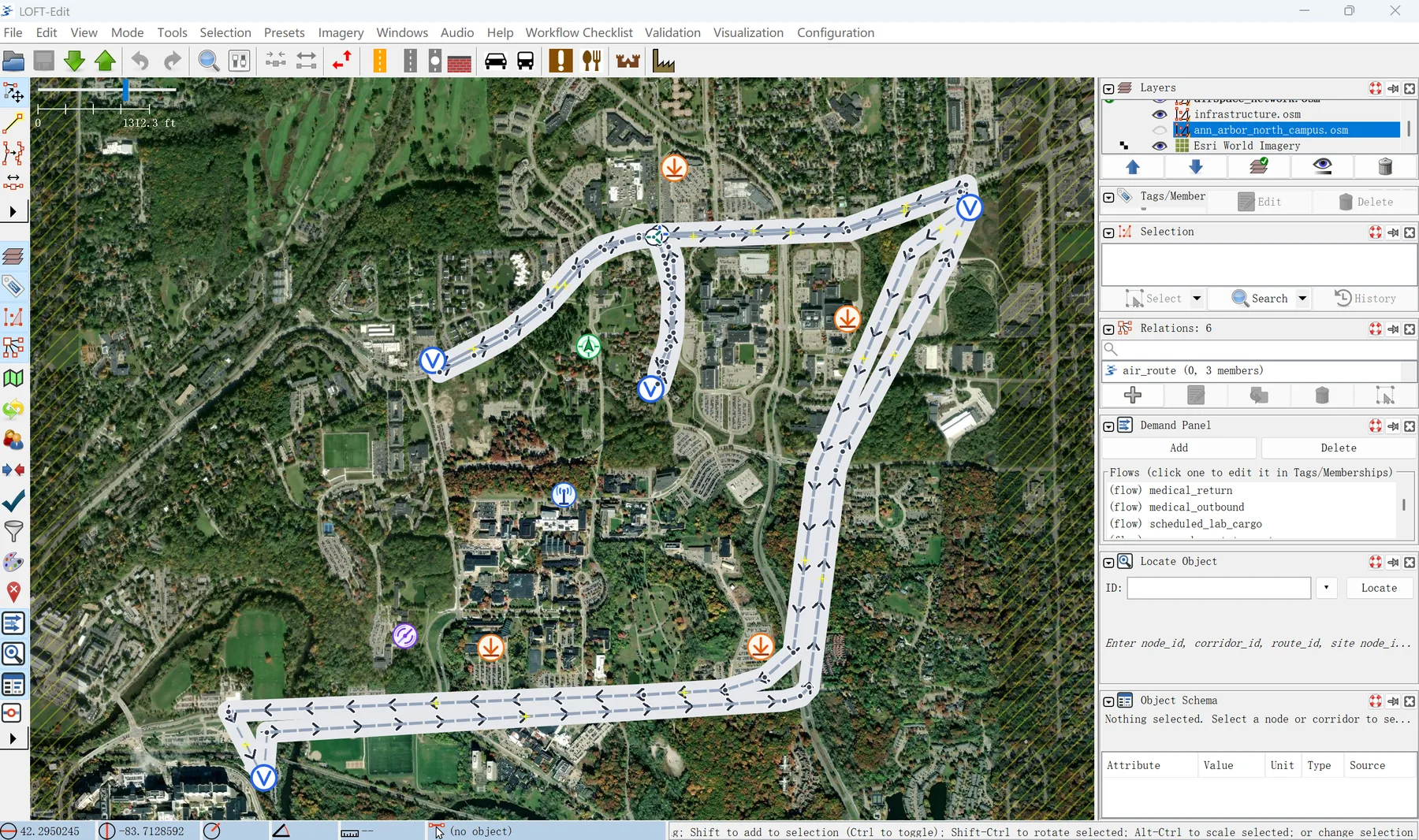
Ann Arbor North Campus sample project in LOFT-Edit.
This project is useful as the first complete example for screenshots, demonstrations, regression checks, and end-to-end simulation tests. It should be treated as a workflow and capability demonstration rather than a calibrated capacity estimate for real Ann Arbor operations.
To explore it, copy examples/sample_demo into workspace/ and open the copy
from the project launcher with Open Existing Project. Opening
examples/sample_demo itself also works, but saving then changes the example
tracked in the repository. Choosing
Ann Arbor sample project when you create a new project starts a project
under workspace/ from the sample’s network, CNS layer and base map, with
empty demand and default configuration. The LOFT-Sim repository carries the
complete sample’s exported package as the scenario
example/scenarios/sample_demo/.
M-Air
The M-Air project is a larger real-world network built around the University of Michigan M-Air concept. M-Air is framed as a real advanced air mobility testbed for connecting U-M sites in Ann Arbor, Dearborn, and Detroit through low-altitude airspace. Its proposed applications include medical delivery, emergency response, air traffic management, infrastructure inspection, remote operation, and student experiential learning. This makes it a natural large-scale example for showing how LOFT-Edit can represent an airspace concept that is connected to a real regional mobility initiative.
As built in the editor, the M-Air project used a background map covering the Ann Arbor–Dearborn–Detroit region. The editable airspace layer modelled connections among M-Air-related vertiports, including Ann Arbor/Mcity, Dearborn, Detroit UMCI, and Willow Run. The project included bidirectional corridor segments, route relations, route-flow demand, simulation configuration, and an operation strategy file.
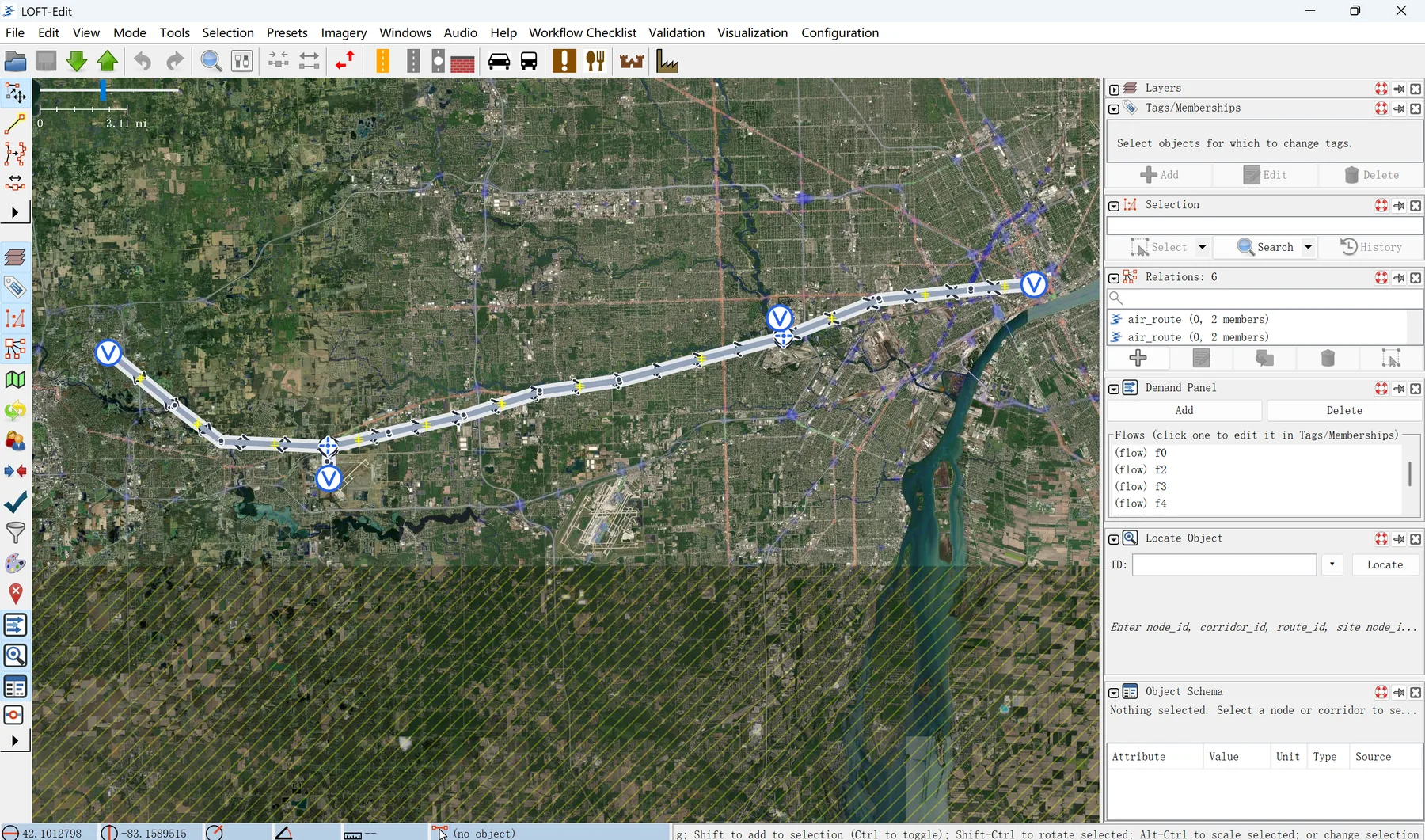
M-Air project in LOFT-Edit.
This project is useful for demonstrating regional-scale corridor design, multi-vertiport route definition, demand assignment across longer routes, and simulation preparation for infrastructure-supported UAM studies. Like the default sample, it is a research scenario, not an approved operational deployment.
The M-Air exported package is kept in the LOFT-Sim repository as
example/scenarios/m_air/, an early-stage scenario that runs headless in
LOFT-Sim while its inputs are being completed. That folder is a simulation
package rather than a LOFT-Edit project (it has no scenario.json), so to
inspect it in the editor, open its network/airspace_network.osm with JOSM’s
File > Open. The regional background map is not kept: the package’s
simulation_config.xml points at the shared North Campus base map,
example/basemap/ann_arbor_north_campus.osm.