
Simulation Configuration
config/simulation_config.xml is the LOFT-Sim run manifest. Open
Configuration > Write Simulation Config after saving at least one demand
flow. Before that, the action does not open its dialog and reports Add demand
flows first; no OD or route flows were found., and the
Workflow Checklist
does not mark this step complete.
Write the Configuration
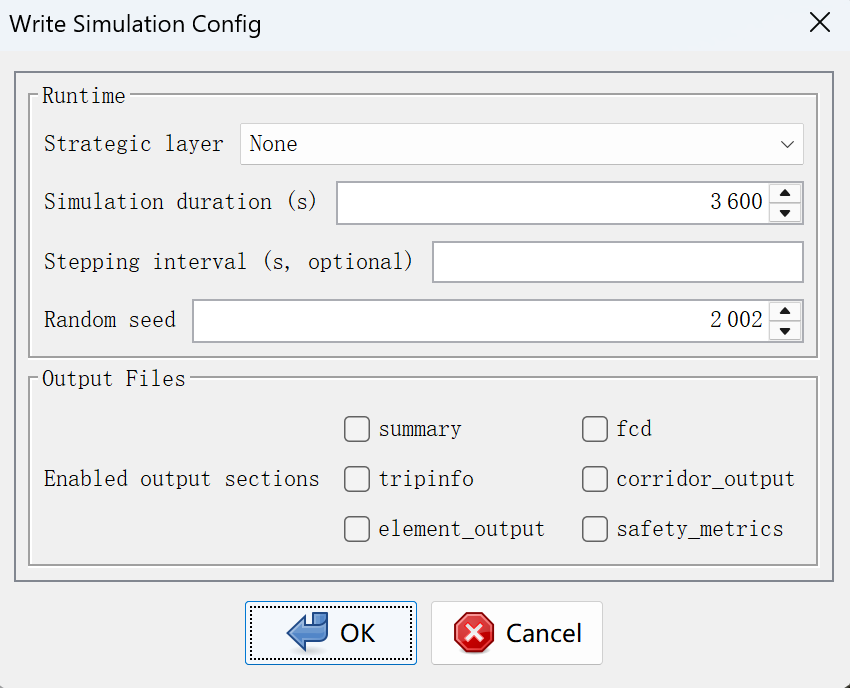
- Open Configuration > Write Simulation Config.
- Select the Strategic layer: None, 4D volume, 4D volume optimized, Capacity-limited departure, Element-centric DCB, or Element-centric DCB optimized (see Strategic Layer).
- Enter simulation duration.
- Enter random seed.
- Select the output sections to write.
- Set output intervals.
- Click OK.
Input Files
| Option | Current role |
|---|---|
network_file |
network/airspace_network.osm. |
demand_file |
config/demand_config.xml. |
additional_file |
Comma-separated additional XML files, normally additional.xml. |
operation_strategy_file |
Optional operation strategy. |
infrastructure_file |
network/infrastructure.osm when CNS sites exist. |
background_osm_file |
Optional background OSM context. |
The config is option-style: each option stores its content in a value
attribute.
<input>
  <network_file value="../network/airspace_network.osm" />
  <demand_file value="demand_config.xml" />
  <additional_file value="additional.xml" />
  <infrastructure_file value="../network/infrastructure.osm" />
</input>
Strategic Layer
The dialog’s Strategic layer row picks the strategic model, and nothing
else. It is not where demand is defined: each flow’s arrival rate, vehicle type and
route are set in demand_config.xml and edited from the Demand Panel.
| Dialog choice | Strategic model written | Extra settings |
|---|---|---|
| None | none: an empty <strategic /> |
No strategic model. Flights follow the arrival processes in demand_config.xml directly; the tactical models and the hard safety checks still handle queues, spacing and conflicts. |
| 4D volume | 4d_volume |
Planning horizon, corridor/node separation, departure search step, maximum departure delay, and optional maximum flights. |
| 4D volume optimized | 4d_volume_opt |
The 4D volume settings plus rolling/batch planning, replan interval, announce lead, commit horizon, optimize iterations, and optimize patience. |
| Capacity-limited departure | capacity_limited_departure |
Capacity scope, default capacity, burst window, maximum ground delay, and hold/reject policy. |
| Element-centric DCB | element_centric_dcb |
Capacity per hour, capacity window, search horizon, release step, metering interval, default speed, maximum departure delay, and optional maximum flights. |
| Element-centric DCB optimized | element_centric_dcb_opt |
The DCB settings plus smoothing weight, spread target, spread tolerance, optimize iterations, and optimize patience. |
Driving departures from outside the simulator needs no choice here: attach the
policy through the ACI at run time and leave the strategic layer at None.
The loft-edit write-sim-config command that the dialog runs also accepts
the historical --mode spellings poisson, external_policy and
external_aci for older scripts; all three write exactly what none writes.
Capacity scope may be route_bottleneck, route, origin, or
resource_path.
Strategy Parameter Groups
The dialog only shows the parameter group that applies to the selected strategic layer.
| Group | Fields |
|---|---|
| 4D volume | planning_horizon, separation_time, node_separation_time, departure_search_step, max_departure_delay, max_flights |
| 4D optimization | fourd_rolling, fourd_replan_interval, fourd_announce_lead, fourd_commit_horizon, fourd_optimize_iterations, fourd_optimize_patience |
| Capacity-limited departure | capacity_scope, queue_policy (always written as priority_fifo), default_capacity_per_hour, burst_window, max_ground_delay, reject_after_max_delay |
| Element-centric DCB | dcb_capacity_per_hour, dcb_capacity_window, dcb_horizon, dcb_release_step, dcb_metering_interval, dcb_default_speed, max_departure_delay, max_flights |
| DCB optimization | dcb_opt_smoothing_weight, dcb_opt_spread_target, dcb_opt_spread_tolerance, fourd_optimize_iterations, fourd_optimize_patience |
preflight_schedule output is offered only for strategic modes that produce a
preflight plan: 4d_volume, 4d_volume_opt, and
element_centric_dcb_opt.
Tactical and Contingency Defaults
Write Simulation Config rewrites config/operation_strategy.xml every time
it runs, so hand edits to that file are overwritten the next time the dialog is
used. Besides the <strategic> block selected above, the writer always emits
the same tactical defaults and an empty contingency block:
<tactical>
  <defaults corridor_model="newell" vertiport_model="newell" intersection_model="fcfs" />
</tactical>
<contingency />
The simulator accepts other values in these blocks, but the dialog does not expose them:
| Layer | Supported values |
|---|---|
| Corridor following | newell, idm, constant_speed |
| Vertiport queueing | newell, idm, constant_speed |
| Intersection handling | fcfs, uncontrolled |
| Contingency handling | threshold_closure, disabled |
IDM headway/gap/acceleration/deceleration parameters and the contingency
thresholds (nav/comm quality, wind, vertical wind, temperature, count
threshold, evaluation interval, closure duration) are simulator defaults that
LOFT-Edit never writes. A scenario that needs them must maintain its own
operation_strategy.xml outside the Write Simulation Config workflow, or
re-apply the edits after each run of the dialog.
Runtime
| Field | Meaning |
|---|---|
| Simulation duration | Total simulated seconds. |
| Stepping interval | Optional explicit simulation step; blank uses the simulator default. |
| Random seed | Reproduces stochastic runs when kept constant. |
Outputs
Enable an output by checking it in the dialog. Omitted output elements are disabled.
| Output | Content |
|---|---|
summary_output |
Simulation-wide interval summaries. |
fcd_output |
Per-vehicle kinematic and energy snapshots. |
tripinfo_output |
One completion record per vehicle. |
preflight_schedule |
Resolved schedule for 4D volume and optimized DCB modes. |
corridor_output |
Per-corridor traffic snapshots. |
element_output |
Monitored network-element states. |
safety_metrics_output |
End-of-run separation metrics. |
The dialog exposes three intervals: Summary interval, FCD interval, and
Corridor output interval. element_output has no dialog field and is
written with the schema default interval of 60. Safety metrics accept a
separation threshold. The writer saves output paths in the file attribute,
for example:
<output>
  <summary_output file="../export/sim_outputs/summary_output.xml" interval="60" />
  <safety_metrics_output file="../export/sim_outputs/safety_metrics_output.xml"
                         separation_threshold="10" />
</output>
Units use the simulator’s canonical SI conventions: time is seconds, distance is metres, and speed is metres per second unless a field explicitly says otherwise.